
Prayer times, azan and the whole Quran, on one small screen.
مواقيت الصلاة والأذان والقرآن الكريم كاملاً، في شاشة صغيرة واحدة.
Mishkat sits on a shelf or a table at home. It knows the prayer times for your city, calls the azan on time, and recites the Quran from its own card, with no phone, no app and no account.
توضع مشكاة على رفّ أو طاولة في البيت. تعرف مواقيت الصلاة في مدينتك، وترفع الأذان في وقته، وتتلو القرآن الكريم من بطاقتها الخاصة، دون هاتف ودون تطبيق ودون حساب.
Everything for the day's prayersكل ما تحتاجه لصلوات اليوم
Set it up once, and it takes care of the rest, day after day.
تُضبط مرة واحدة، ثم تتولى الباقي يوماً بعد يوم.
Exact times for your cityمواقيت دقيقة لمدينتك
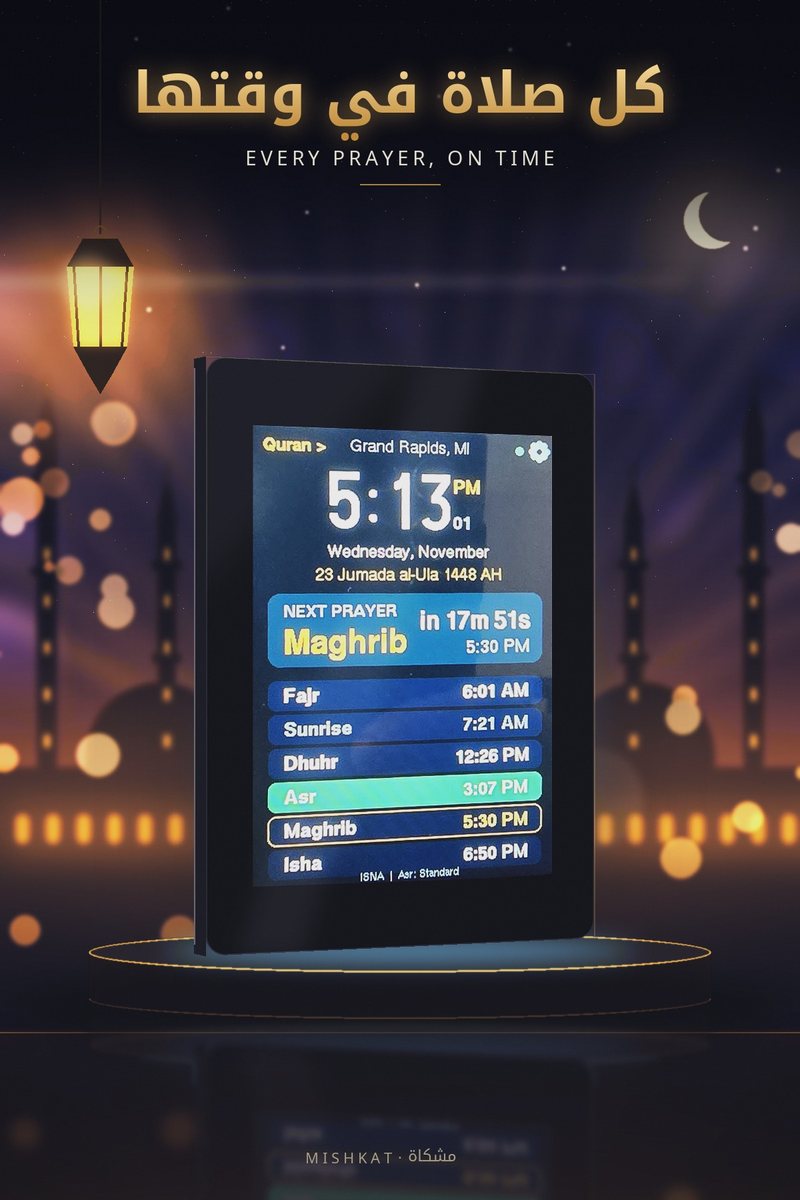
It finds your city from the internet and works out the five prayers, sunrise included, for every day of the year. Summer and winter clock changes are automatic.
تعرف مدينتك من الإنترنت وتحسب الصلوات الخمس مع الشروق لكل يوم من أيام السنة. ويتم التحويل بين التوقيت الصيفي والشتوي تلقائياً.
The azan, on timeالأذان في وقته
The azan plays at each prayer with a clear speaker, and the screen shows which prayer it is. One tap stops it.
يُرفع الأذان عند كل صلاة بصوت واضح، وتعرض الشاشة اسم الصلاة. لمسة واحدة توقفه.
The whole Quran insideالقرآن الكريم كاملاً بداخلها
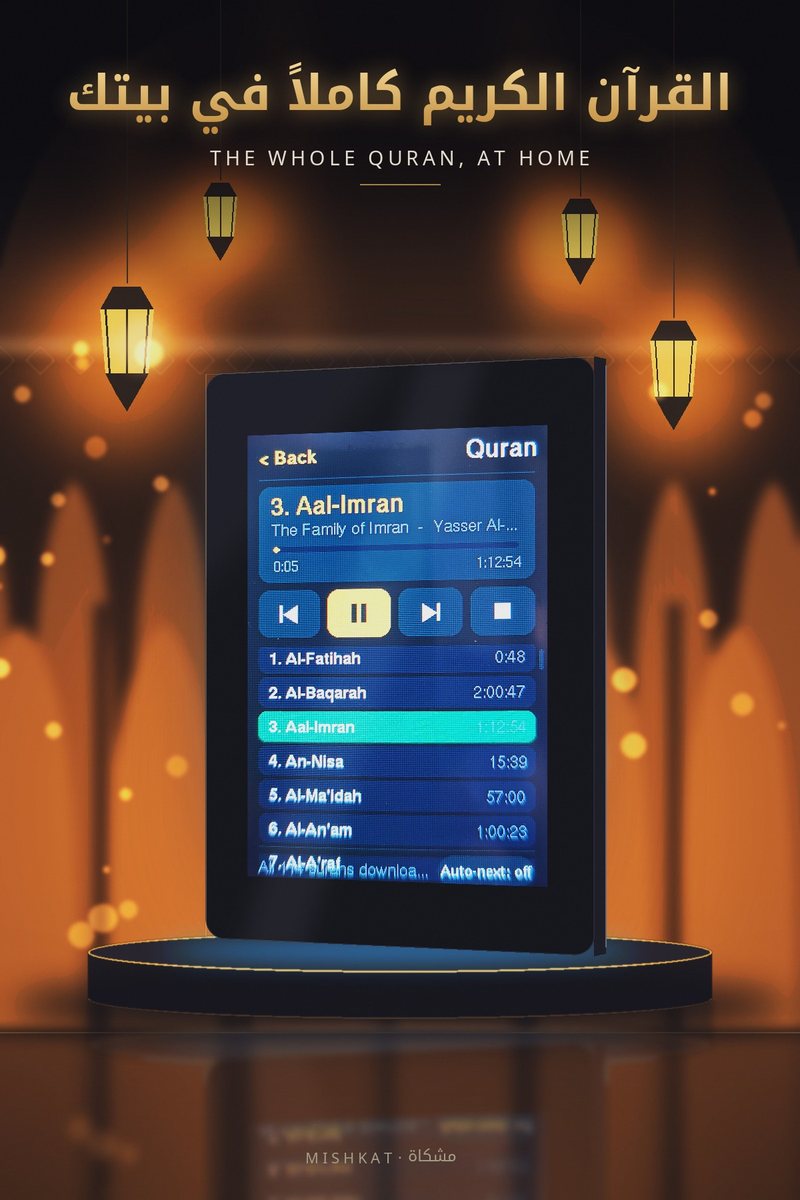
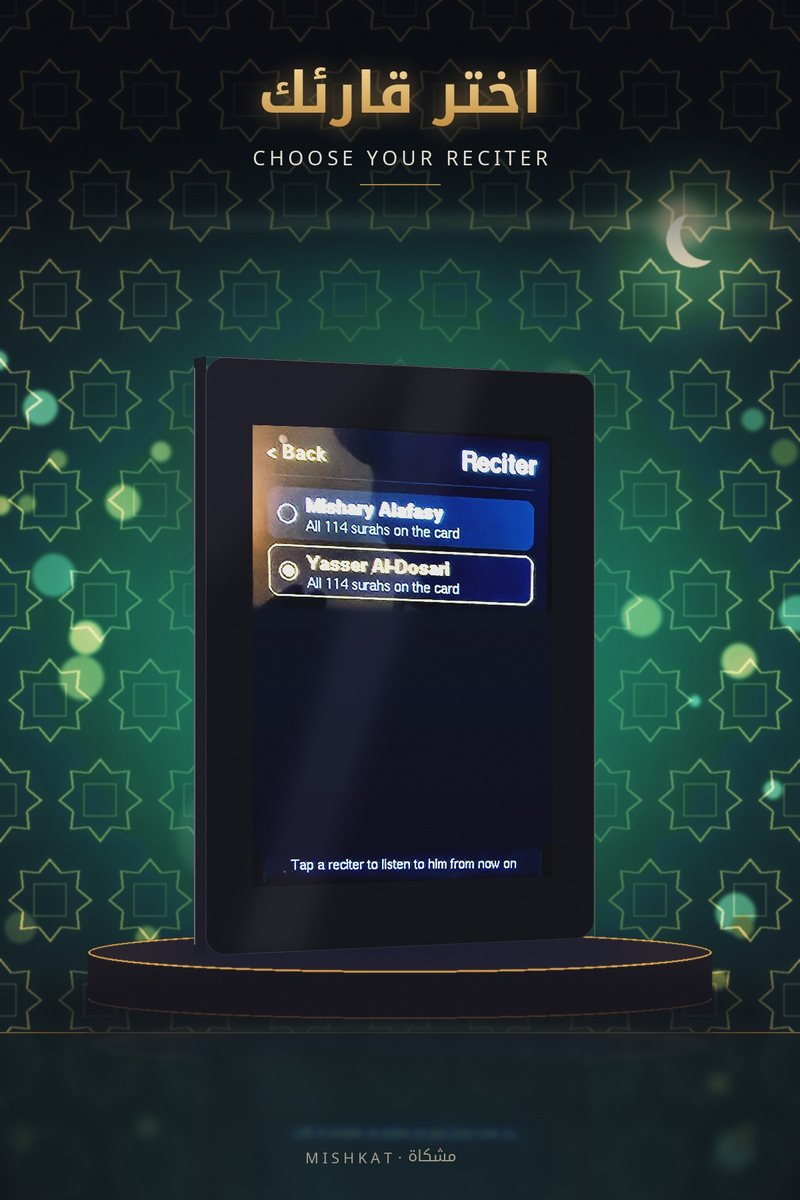
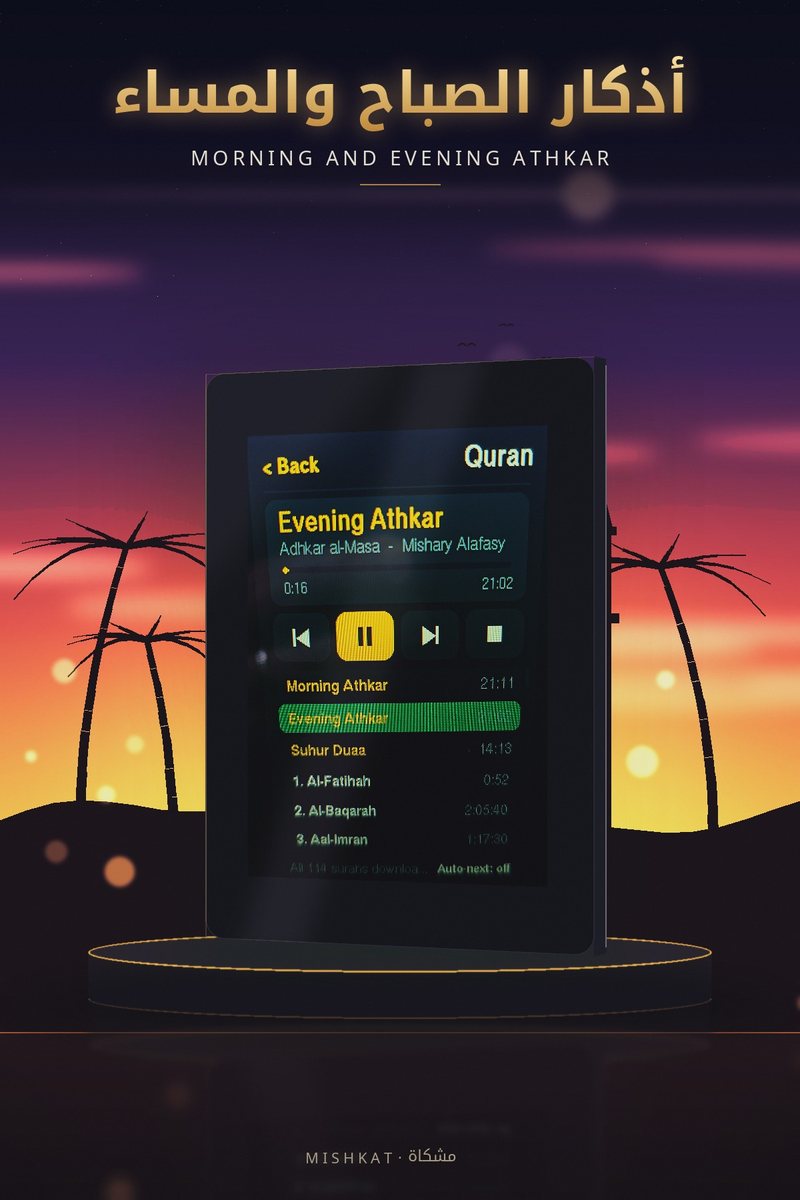
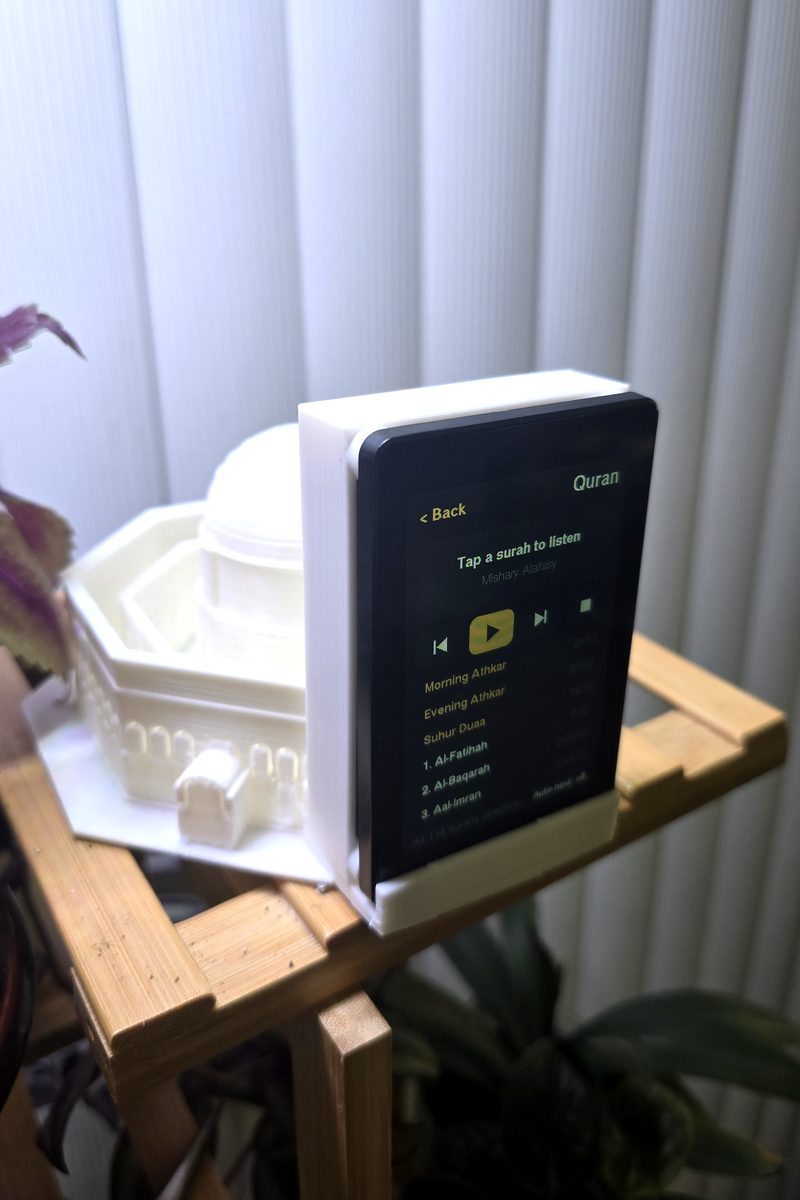
All 114 surahs are on its card, so they play even without internet. Pick a surah, pause, skip, or let it play on to the next one. Choose between the reciters on the card.
السور الـ114 كلها على بطاقتها، فتعمل حتى دون إنترنت. اختر سورة، أو أوقفها مؤقتاً، أو انتقل إلى غيرها، أو دعها تنتقل إلى السورة التالية. ويمكنك الاختيار بين القرّاء الموجودين على البطاقة.
Al-Kahf and Al-Baqarahسورة الكهف وسورة البقرة
Surah Al-Kahf plays by itself every Friday, and Surah Al-Baqarah every day if you like, each at the time you choose.
تُتلى سورة الكهف تلقائياً كل يوم جمعة، وسورة البقرة كل يوم إن شئت، كلٌّ في الوقت الذي تختاره.
Morning and evening athkarأذكار الصباح والمساء
The athkar play after Fajr and Maghrib, before them, or at a fixed time. You can also play them yourself whenever you want.
تُتلى الأذكار بعد الفجر والمغرب، أو قبلهما، أو في وقت ثابت تختاره. ويمكنك تشغيلها بنفسك متى شئت.
Suhur alertتنبيه السحور
In Ramadan, or whenever you fast, tick one box and it wakes you with a duaa before Fajr, as many minutes ahead as you choose.
في رمضان أو متى صمت، علّم مربعاً واحداً فتوقظك بدعاء قبل الفجر، بالعدد الذي تختاره من الدقائق.
Your method, your madhhabطريقة الحساب ومذهبك
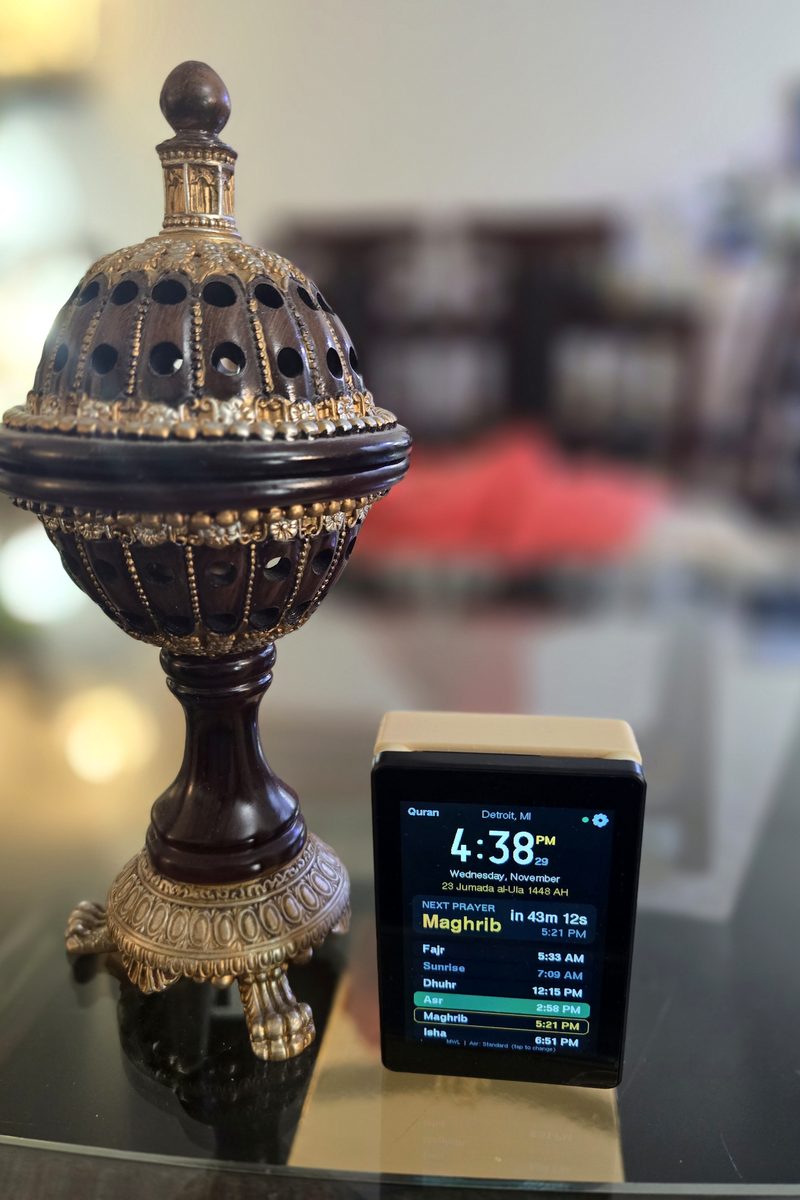
Choose ISNA, Muslim World League, Egypt or Karachi, and Standard or Hanafi Asr, right on the screen. Today's times change at once.
اختر طريقة الحساب: أمريكا الشمالية، أو رابطة العالم الإسلامي، أو مصر، أو كراتشي، والعصر على مذهب الجمهور أو الحنفي، من الشاشة نفسها. وتتغير مواقيت اليوم فوراً.
Quiet and easy on powerهادئة وموفّرة للطاقة
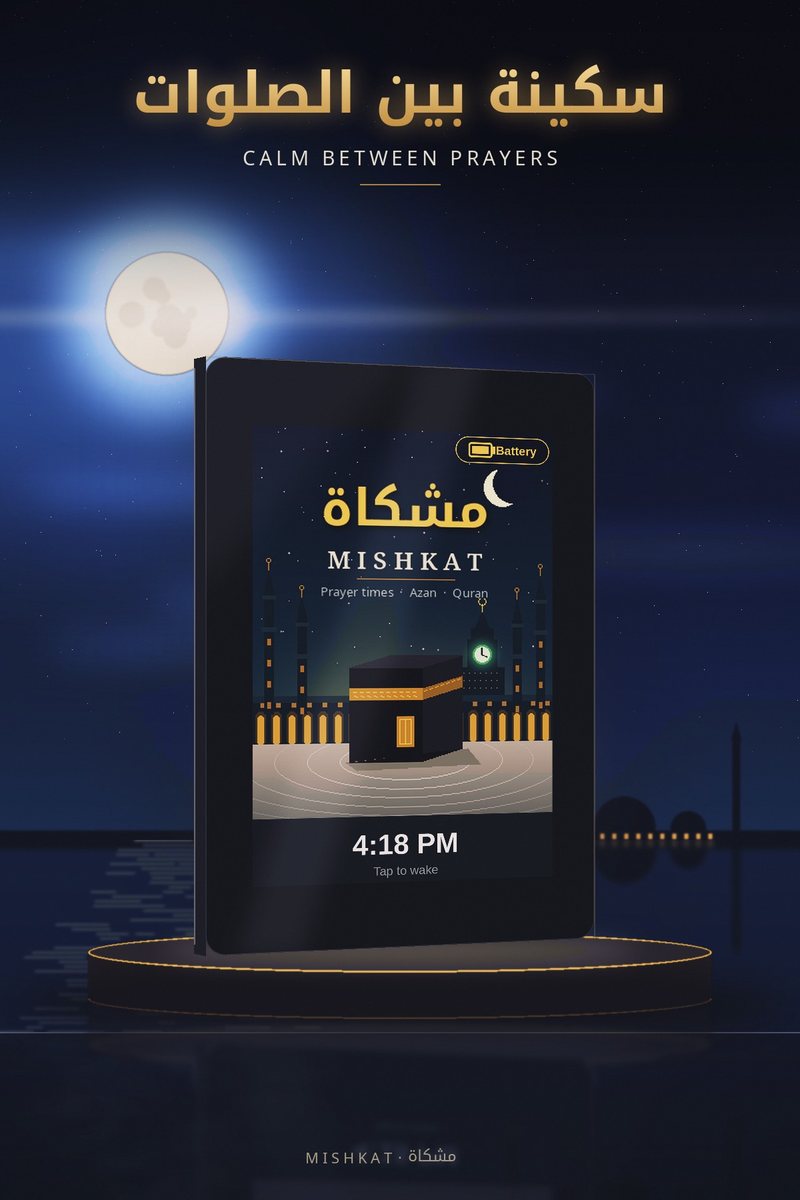
The screen rests between prayers and shows the time softly, then goes dark. A tap wakes it. It can also run on its battery and tells you when it's plugged in.
تهدأ الشاشة بين الصلوات وتعرض الوقت بإضاءة خافتة، ثم تنطفئ. لمسة واحدة توقظها. ويمكنها العمل على بطاريتها، وتخبرك إن كانت موصولة بالكهرباء.
Ready in three stepsجاهزة في ثلاث خطوات
No laptop and no app. Everything is done from the screen and your phone's camera.
دون حاسوب ودون تطبيق. كل شيء يتم من الشاشة وكاميرا هاتفك.
Plug it inصِلها بالكهرباء
Connect the USB cable to a phone charger. The Mishkat picture appears, then the WiFi setup screen with a QR code.
صِل كابل USB بشاحن هاتف. تظهر صورة مشكاة، ثم شاشة إعداد الواي فاي مع رمز QR.
Connect your WiFiصِلها بالواي فاي
Scan the code with your phone. A page opens: pick your home WiFi, type its password, and tap Connect.
امسح الرمز بهاتفك. تُفتح صفحة: اختر شبكة البيت، واكتب كلمة المرور، ثم اضغط Connect.
That's itوانتهى الأمر
Mishkat finds your city, sets its clock, and shows today's prayer times. The azan plays at the next prayer.
تعرف مشكاة مدينتك، وتضبط ساعتها، وتعرض مواقيت اليوم. ويُرفع الأذان عند الصلاة القادمة.
See and hear itشاهدها واستمع إليها
Tap a video to play it with sound.
اضغط على المقطع لتشغيله مع الصوت.
Charging standsقواعد الشحن
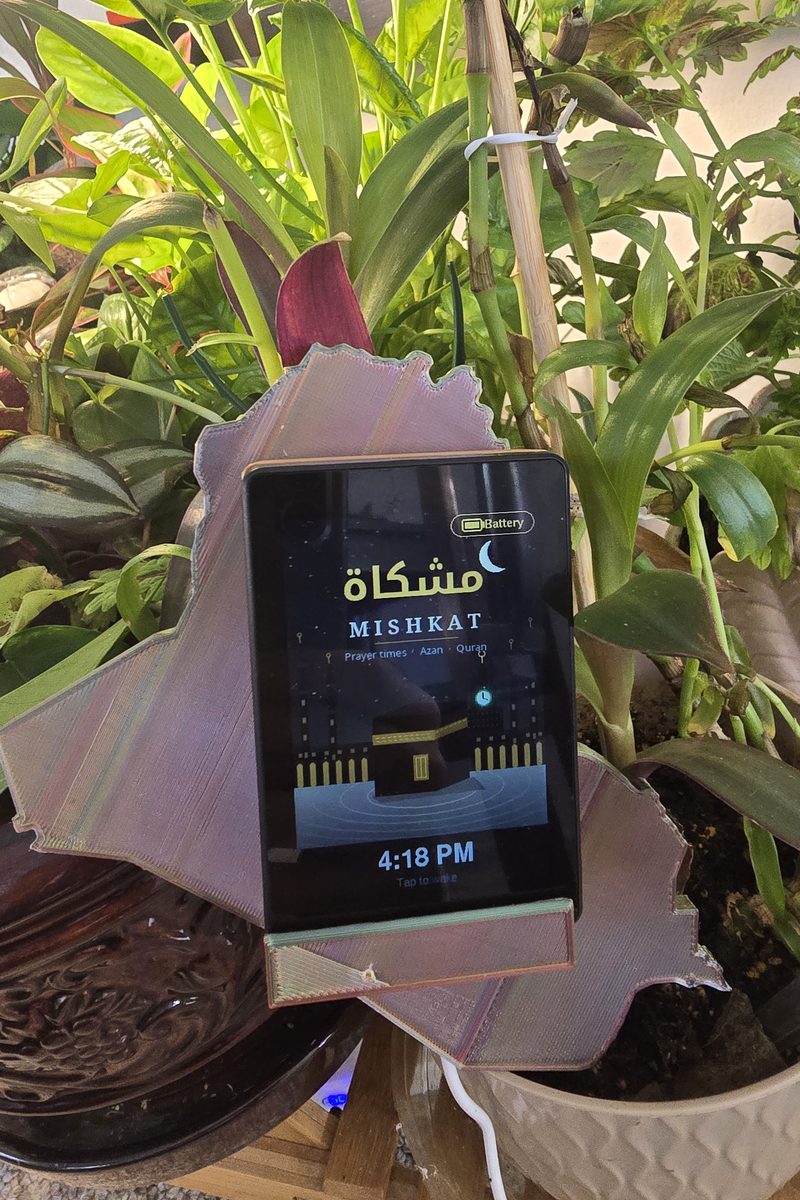
Every Mishkat comes with a battery and a regular charging stand. For a personal touch, choose a stand made just for you, like the map of your country or a mosque, for an extra cost that depends on the design.
تأتي كل مشكاة مع بطارية وقاعدة شحن عادية. ولمسة خاصة، اختر قاعدة مصنوعة لك خصيصاً، مثل خريطة بلدك أو مسجد، بتكلفة إضافية تعتمد على التصميم.
User guideدليل الاستخدام
Everything you can do on the screen. Tap a topic to open it.
كل ما يمكنك فعله من الشاشة. اضغط على أي موضوع لفتحه.
First start and WiFiالتشغيل الأول والواي فاي
- Connect Mishkat to a USB phone charger with its cable.
- After the start-up picture, the screen shows a QR code and the name Mishkat-Setup.
- Scan the code with your phone's camera, or join the WiFi called Mishkat-Setup in your phone's settings.
- A setup page opens on the phone. If it doesn't, open 192.168.4.1 in the phone's browser.
- Pick your home WiFi, type its password, and tap Connect. The screen tells you if it worked.
- صِل مشكاة بشاحن هاتف USB بواسطة كابلها.
- بعد صورة البداية، تعرض الشاشة رمز QR واسم الشبكة Mishkat-Setup.
- امسح الرمز بكاميرا هاتفك، أو اتصل بشبكة الواي فاي المسماة Mishkat-Setup من إعدادات الهاتف.
- تُفتح صفحة الإعداد على الهاتف. وإن لم تُفتح، فافتح العنوان 192.168.4.1 في متصفح الهاتف.
- اختر شبكة البيت، واكتب كلمة المرور، ثم اضغط Connect. وتخبرك الشاشة إن نجح الاتصال.
Mishkat needs a 2.4 GHz WiFi network. Most home routers have one. Networks that are only 5 GHz don't work.
تحتاج مشكاة إلى شبكة واي فاي بتردد 2.4 جيجاهرتز، وهي موجودة في أغلب أجهزة الراوتر المنزلية. أما الشبكات التي تعمل بتردد 5 جيجاهرتز فقط فلا تعمل معها.
The main screenالشاشة الرئيسية
| Where | What it shows or does |
|---|---|
| Top middle | Your city |
| Middle | The time now, the next prayer and how long until it, and today's six times |
| Quran, top left | Opens the Quran page |
| ⚙, top right | Opens the Settings page |
| Bottom line | The calculation method and Asr. Tap it to change them |
| المكان | ما يعرضه أو يفعله |
|---|---|
| أعلى الوسط | اسم مدينتك |
| الوسط | الوقت الآن، والصلاة القادمة والوقت المتبقي لها، ومواقيت اليوم الستة |
| Quran أعلى اليسار | يفتح صفحة القرآن |
| ⚙ أعلى اليمين | يفتح صفحة الإعدادات |
| السطر الأخير | طريقة الحساب والعصر. اضغط عليه لتغييرهما |
Changing the method: tap the bottom line, then a method (ISNA for North America, MWL for Europe, Egypt for Africa and the Middle East, Karachi for Pakistan and India) and Standard or Hanafi for Asr. The page shows today's times with your choice right away.
تغيير طريقة الحساب: اضغط على السطر الأخير، ثم اختر الطريقة (ISNA لأمريكا الشمالية، وMWL لأوروبا، وEgypt لأفريقيا والشرق الأوسط، وKarachi لباكستان والهند)، ثم Standard (الجمهور) أو Hanafi (الحنفي) للعصر. وتعرض الصفحة مواقيت اليوم باختيارك فوراً.
At prayer timeعند وقت الصلاة
- The screen lights up, shows a gold page with the prayer's name, and plays the azan.
- Tap once to stop the azan. Tap again to close the gold page.
- If the Quran or the athkar are playing, they stop for the azan.
- تُضيء الشاشة وتعرض صفحة ذهبية باسم الصلاة، ويُرفع الأذان.
- المس الشاشة مرة لإيقاف الأذان، ومرة أخرى لإغلاق الصفحة الذهبية.
- إن كان القرآن أو الأذكار قيد التشغيل، فإنها تتوقف ليُرفع الأذان.
Listening to the Quranالاستماع إلى القرآن
- Tap Quran at the top left of the main screen.
- Tap a surah in the list to play it. Drag the list up or down to see all 114.
- The buttons: ⏮ previous surah, ▶ / ⏸ play or pause, ⏭ next surah, ■ stop.
- Auto-next (bottom right): when it's on, the next surah starts when one finishes.
- The first three gold rows are the morning athkar, the evening athkar and the Suhur duaa. Tap one to play it.
- To change the reciter, tap the panel at the top with the reciter's name, then pick a reciter.
- The recitation keeps playing when the screen dims. Tap to wake it.
- اضغط على Quran أعلى يسار الشاشة الرئيسية.
- اضغط على أي سورة في القائمة لتشغيلها، واسحب القائمة إلى الأعلى أو الأسفل لرؤية السور الـ114 كلها.
- الأزرار: ⏮ السورة السابقة، ▶ / ⏸ تشغيل أو إيقاف مؤقت، ⏭ السورة التالية، ■ إيقاف.
- Auto-next (أسفل اليمين): عند تفعيله تبدأ السورة التالية تلقائياً بعد انتهاء السورة.
- الصفوف الثلاثة الذهبية الأولى هي أذكار الصباح وأذكار المساء ودعاء السحور. اضغط على أحدها لتشغيله.
- لتغيير القارئ، اضغط على اللوحة العلوية التي فيها اسم القارئ، ثم اختر القارئ.
- تستمر التلاوة عندما تخفت الشاشة. المسها لإيقاظها.
Al-Kahf, Al-Baqarah, athkar and Suhur timesأوقات الكهف والبقرة والأذكار والسحور
Tap ⚙, then Times at the bottom right. Each row has an On/Off switch and − / + to move its time. Hold − or + to move faster.
اضغط على ⚙ ثم Times أسفل اليمين. في كل صف مفتاح On/Off للتشغيل والإيقاف، والزرّان − / + لتغيير الوقت. اضغط عليهما باستمرار للتغيير بسرعة.
| Row | What you set |
|---|---|
| Al-Kahf | The time it plays every Friday |
| Al-Baqarah | The time it plays every day |
| Morning and evening athkar | Minutes after (or before) Fajr and Maghrib. Tap the time itself to switch to a fixed time, like 6:00 |
| Suhur | How many minutes before Fajr the duaa plays |
| الصف | ما تضبطه |
|---|---|
| الكهف | وقت تلاوتها كل يوم جمعة |
| البقرة | وقت تلاوتها كل يوم |
| أذكار الصباح والمساء | عدد الدقائق بعد الفجر والمغرب (أو قبلهما). اضغط على الوقت نفسه لتجعله وقتاً ثابتاً، مثل 6:00 |
| السحور | كم دقيقة قبل الفجر يُتلى الدعاء |
Your choices are saved by themselves after two seconds. Turn the Suhur alert on or off with its box on the Settings page.
تُحفظ اختياراتك تلقائياً بعد ثانيتين. ويُفعَّل تنبيه السحور أو يُلغى من مربعه في صفحة الإعدادات.
Settings and volumeالإعدادات ومستوى الصوت
Tap ⚙ at the top right of the main screen.
اضغط على ⚙ أعلى يمين الشاشة الرئيسية.
- Volume: tap − or +, or a spot on the gold bar. A short beep plays at the new level. It's the volume for the azan, the Quran and the athkar.
- Suhur alert: tick the box to play the Suhur duaa before Fajr every day.
- Change WiFi network: shows the QR code again, for a new router or password.
- Update location: finds your city again, for example after moving.
- Times: see the section above.
- مستوى الصوت: اضغط على − أو +، أو على أي نقطة في الشريط الذهبي، فتسمع نغمة قصيرة بالمستوى الجديد. وهو مستوى صوت الأذان والقرآن والأذكار.
- تنبيه السحور: علّم المربع ليُتلى دعاء السحور قبل الفجر كل يوم.
- Change WiFi network: يعرض رمز QR من جديد، عند تغيير الراوتر أو كلمة المرور.
- Update location: يحدد مدينتك من جديد، بعد الانتقال مثلاً.
- Times: انظر القسم السابق.
Battery, sleep and turning offالبطارية والسكون والإطفاء
- Sleep: after a minute without a touch, the screen dims and shows the Mishkat picture with the time for 5 minutes, then goes dark. The azan still plays on time. Tap to wake it.
- Power badge: on that dim page, the top-right corner shows a green plug, Plugged in, or a gold battery, Battery.
- Turning it off: tap ⚙, then the power icon in the middle of the top bar, then Yes, turn off. While it's off there is no azan. It turns on again when you plug in the cable.
- السكون: بعد دقيقة دون لمس، تخفت الشاشة وتعرض صورة مشكاة مع الوقت لمدة 5 دقائق، ثم تنطفئ. ويبقى الأذان في وقته. المسها لإيقاظها.
- شارة الطاقة: في تلك الصفحة الخافتة، تظهر في الزاوية العليا قابس أخضر Plugged in (موصولة بالكهرباء)، أو بطارية ذهبية Battery (تعمل على البطارية).
- الإطفاء: اضغط على ⚙، ثم أيقونة الطاقة في وسط الشريط العلوي، ثم Yes, turn off. ولا يُرفع الأذان وهي مطفأة. وتعمل من جديد عند وصل الكابل.
If something goes wrongإذا حدثت مشكلة
| You see | Try this |
|---|---|
| "No WiFi connection" | Tap the screen to open WiFi setup, then connect again from your phone. Check that it's a 2.4 GHz network. |
| The wrong city at the top, or times a few minutes off | Some internet providers report a city far away. Tap ⚙ then Update location. If it's still wrong, email us your city and we'll set it for you. |
| "No SD card" on the Quran page | Push the card in until it clicks, then unplug the cable and plug it back in. |
| The screen stays dark | Tap it. If nothing happens, unplug the cable, wait a few seconds and plug it back in. |
| ما تراه | جرّب ما يلي |
|---|---|
| "No WiFi connection" | المس الشاشة لفتح إعداد الواي فاي، ثم اتصل من هاتفك مرة أخرى. وتأكد أن الشبكة بتردد 2.4 جيجاهرتز. |
| اسم مدينة خاطئ في الأعلى، أو مواقيت تختلف ببضع دقائق | بعض مزوّدي الإنترنت يُظهرون مدينة بعيدة. اضغط على ⚙ ثم Update location. وإن بقي الخطأ، راسلنا باسم مدينتك وسنضبطها لك. |
| "No SD card" في صفحة القرآن | ادفع البطاقة حتى تسمع صوت تثبيتها، ثم افصل الكابل وأعد وصله. |
| الشاشة تبقى مظلمة | المسها. وإن لم يحدث شيء، افصل الكابل وانتظر بضع ثوانٍ ثم أعد وصله. |
Questionsأسئلة شائعة
Does it need internet all the time?هل تحتاج إلى الإنترنت دائماً؟
It uses your WiFi to find your city and keep its clock exact. The prayer times are worked out on the device itself, and the Quran plays from its own card, so a short internet outage changes nothing.
تستخدم الواي فاي لتحديد مدينتك وضبط ساعتها بدقة. أما المواقيت فتُحسب داخل الجهاز نفسه، والقرآن يُتلى من بطاقتها، فلا يؤثر انقطاع الإنترنت لفترة قصيرة في شيء.
What if I move to another city or country?ماذا لو انتقلت إلى مدينة أو بلد آخر؟
Connect it to the new WiFi. It finds the new city and time zone by itself, and knows the clock-change rules of every country.
صِلها بالواي فاي الجديد، فتحدد المدينة والمنطقة الزمنية الجديدة بنفسها، وهي تعرف قواعد تغيير الساعة في كل البلدان.
Which calculation method should I choose?أي طريقة حساب أختار؟
Choose the one your local mosque uses: ISNA is common in North America, MWL in Europe, Egypt in Africa and the Middle East, and Karachi in Pakistan and India. You can compare with the mosque's timetable and change it any time.
اختر الطريقة التي يعتمدها مسجدك: ISNA شائعة في أمريكا الشمالية، وMWL في أوروبا، وEgypt في أفريقيا والشرق الأوسط، وKarachi في باكستان والهند. ويمكنك المقارنة بتقويم المسجد وتغييرها متى شئت.
Does it need an account or an app?هل تحتاج إلى حساب أو تطبيق؟
No. There is no account, no app and no subscription. Mishkat doesn't collect anything about you.
لا. لا حساب ولا تطبيق ولا اشتراك. ولا تجمع مشكاة أي معلومات عنك.
How loud is it?ما مدى ارتفاع صوتها؟
Loud enough for a room. The volume goes from a quiet 10% to 100% on the Settings page.
بما يكفي لغرفة. ويتدرج مستوى الصوت من 10% الهادئ إلى 100% من صفحة الإعدادات.
Order your Mishkatاطلب مشكاتك
Each screen is put together and tested by hand, with the whole Quran already on its card.
كل شاشة تُجمع وتُختبر يدوياً، والقرآن الكريم كاملاً على بطاقتها مسبقاً.
Tell us your city, how many screens you'd like, and if you want a personal stand.
أخبرنا باسم مدينتك، وعدد الشاشات التي تريدها، وإن كنت ترغب في قاعدة خاصة.
In the boxمحتويات العلبة
- Mishkat, a 3.5-inch touchscreen with a built-in speaker
- Memory card with all 114 surahs and the athkar
- Battery, so it keeps going when unplugged
- Regular charging stand
- USB cable
- Printed quick guide
- مشكاة: شاشة لمس بحجم 3.5 بوصة مع سماعة مدمجة
- بطاقة ذاكرة عليها السور الـ114 والأذكار
- بطارية، لتستمر في العمل عند فصل الكهرباء
- قاعدة شحن عادية
- كابل USB
- دليل مختصر مطبوع
Optional: a personal charging stand. The price depends on the design; email us your idea.
اختياري: قاعدة شحن خاصة، ويعتمد سعرها على التصميم. راسلنا بفكرتك.